
Sending Check-in Reports
The moment your last guest walks through the door, the pressure to deliver numbers can begin. Instead of rushing to find a laptop, logging into the web portal, you can now generate and send the Excel check-in report directly from the device in your hand.
What it does
This feature gives you the power to trigger a full report export via email straight from the Check-in App.
- Instant Data Delivery: Send the complete check-in data as an Excel file (.xlsx) to any recipient you choose.
- Manager-Only Access: Only team members with manager-level permissions can receive reports (visible within the app), ensuring that sensitive data is only sent to authorized staff.
- Post-Event Efficiency: Wrap up your event and provide final numbers to your boss or client in under 30 seconds, even if you are already packing up gear.
How it works
Sending a report is designed to be simple, fast, and intuitive, requiring just a few taps on your screen.
- Open the Check-in App on the device you used for the event.
- Navigate to the Menu (the hamburger icon in the lower-left).
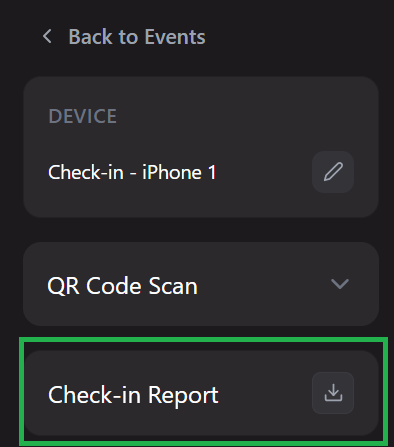
- Select "Check-in Report." This will open the report generation menu.
- Choose Recipient(s): A dropdown menu will appear showing all eligible team members with manager rights. Select the person (or yourself) who should receive the report.
- Send: Tap the send button. The report generates and sends instantly.
The screenshot below is showing the menu with "Check-in Report" highlighted.
The screenshot below is showing the dropdown menu of eligible team members to send the report to.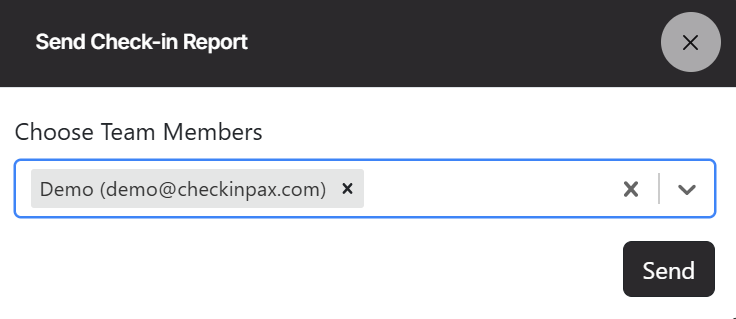
The biggest advantage is the sheer convenience. You can be at the after party, the front door, or in the parking lot, and still have the power to deliver a professional report instantly.
No Backend Required
Forget the hassle of "I need to find a computer". This feature pushes the report functionality directly to the app you are already using.
Late-Night Requests Made Easy
It’s late at night, the event is wrapped up, and your boss or client asks for a check-in report. With this feature, it’s a 30-second task completed on your phone. No opening the laptop, no waiting for it to boot up, no searching for the venue's Wi-Fi password. Just tap and send.
Empower Your Team
If you have multiple managers on site, each person with the app can independently send reports. This means if one manager is busy packing up AV equipment, another can handle the data delivery instantly.
Important notes
- Manager Rights Required: A user must have manager-level permissions to see and use the report-sending feature.
- Recipient List Limitation: The dropdown menu only displays team members with the appropriate manager rights. You cannot send these reports to general staff, assistants or guests via this feature.
- Data Security: Ensure that you are sending reports to the correct recipient, as the data contains guest check-in details.
Pro tips
- Pre-Event Testing: Send a test report to yourself during the setup phase.
- Client Handover: If your client expects a final report immediately after the event, add them as a team member and manager before the event starts so they appear in the dropdown list on site.
- Save Your Own Email: Keep your own email (e.g. as the event admin) in the system so you can easily send a backup copy to yourself for your records while on the go.
- Use It for Mid-Event Checks: You don’t have to wait until the end. Use this feature to send a status update to stakeholders halfway through the event.
Related Articles
- Downloading reports
- Adding Team Members
- Managing Team Member Rights
- Managing Event Access